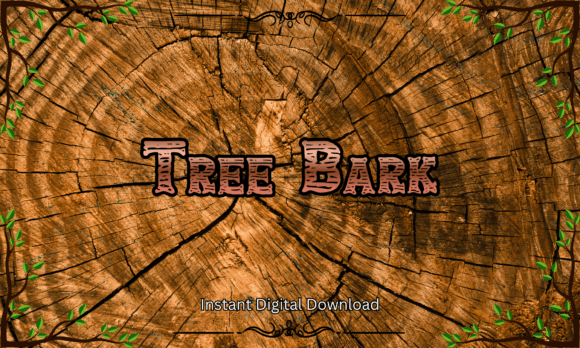
Tree Bark Font: A Rustic Typeface for Wilderness Projects
There's a particular feeling you get when you step into a forest—the smell of pine needles underfoot, the sound of wind moving through high branches, the rough texture of bark beneath your fingertips. That tactile, grounded sensation is exactly what the Tree Bark font captures in digital form. It's a display typeface designed to channel the rugged beauty of woodland landscapes, and for anyone working on projects that need an authentic, handcrafted look, it fills a gap that polished modern fonts simply can't.
Think about the last time you saw a carved wooden sign at a trailhead or a rustic cabin nameplate. Those letterforms don't come from a computer screen—they come from chisels, time, and the natural grain of wood. Tree Bark recreates that visual language digitally, giving you access to a typeface that looks like it was etched into timber. The texture isn't just decorative. It communicates something specific: authenticity, nature, warmth, and a connection to the outdoors.
Why Texture Matters in Display Typography
Most of the fonts we encounter daily are clean, smooth, and optimized for screen reading. Sans serif fonts dominate web design. Serif fonts anchor editorial layouts. Script and handwritten fonts add personality to invitations and branding. But when a project calls for something that feels raw, organic, and unmistakably earthy, those familiar categories fall short.
Tree Bark operates in a different space. As a display font, it's not meant for body text or lengthy paragraphs. It's built for headlines, logos, signage, and any context where a single word or short phrase needs to carry visual weight and set an immediate mood. The bark texture embedded in each letterform does heavy lifting here. Instead of relying on color or imagery to convey a woodland theme, the typography itself becomes the storytelling element.
This is particularly useful for small business owners and entrepreneurs in the outdoor recreation space. A hiking gear company, a campground, a rustic wedding venue, or a farm-to-table restaurant could use this typeface across their branding to establish a cohesive visual identity that feels rooted in nature. The font does the work of communicating brand values before a customer reads a single word of copy.
Practical Applications Across Design Projects
The versatility of a typeface like Tree Bark extends well beyond a single use case. Here's where it tends to shine in real-world design work:
- Logo design: A textured display font gives logos immediate character. Pair Tree Bark with a simple sans serif for body copy, and you have a brand identity that balances ruggedness with readability.
- Packaging design: Artisan products—especially those in the food, beverage, or outdoor gear categories—benefit from packaging that signals handcrafted quality. Using Tree Bark on labels, boxes, or wrapping paper reinforces that positioning.
- Social media graphics: Instagram posts, Pinterest pins, and Facebook headers all need to stop the scroll. A bold, textured headline set in Tree Bark can anchor a graphic and make it visually distinct in a crowded feed.
- Signage and wall art: Whether it's a printable quote for a cabin wall or a directional sign for an event, the carved wood aesthetic of this font translates beautifully to print.
- Merchandise: T-shirt designs, tote bags, stickers, and decals all benefit from typefaces that look good at larger sizes. Tree Bark's detailed texture holds up well when scaled, making it a strong choice for print-on-demand products.
- Event invitations: Rustic weddings, outdoor birthday parties, camping-themed baby showers—these events call for stationery that sets the right tone from the start.
- Editorial and blog design: Bloggers covering topics like hiking, sustainable living, or rural lifestyles can use Tree Bark for section headers and featured image text to reinforce their niche visually.
Pairing Tree Bark with Other Typefaces
No font works in isolation. Even the most distinctive display typeface needs supporting fonts to handle body text, subheadings, and functional elements like navigation or captions. The key to working with Tree Bark is understanding its personality and choosing companions that complement rather than compete.
A clean sans serif font like Montserrat, Open Sans, or Lato works well for body copy. These fonts are highly readable at small sizes and won't clash with Tree Bark's textured, organic character. For a slightly warmer pairing, consider a soft serif like Lora or Merriweather—these add a touch of elegance while maintaining the natural feel.
Avoid pairing Tree Bark with other heavily stylized fonts. A script font or another textured display typeface alongside it will create visual noise rather than hierarchy. The goal is contrast: let Tree Bark be the bold, attention-grabbing element while supporting fonts handle the quiet, functional work.
When testing pairings, set a mock headline in Tree Bark and place your body font directly below it. Look at the relationship between the two. Do they feel balanced? Does one overpower the other? Can you read the body text easily after the eye-catching headline? These practical checks matter more than following rigid typographic rules.
File Formats, Compatibility, and Licensing
Tree Bark ships in both TTF and OTF formats, which means it works across virtually every design platform you're likely to use. Cricut Design Space, Silhouette Studio, Canva, Adobe Illustrator, Adobe Photoshop, Procreate, Microsoft Word, and PowerPoint all support these standard font files. If you're a crafter using a cutting machine for decals or a designer working in professional software, installation is straightforward.
The font includes uppercase letters from A through Z, along with numbers and symbols. This character set covers the vast majority of design needs—logos, headlines, signage, and short-form text. For projects requiring lowercase letters or extended language support, it's worth checking the full character map before purchasing.
Commercial use is included, which removes a significant barrier for small business owners and entrepreneurs. You can use Tree Bark in client work, on products you sell, in marketing materials, and across digital platforms without additional licensing fees. This is an important consideration that's often overlooked when selecting design assets. A beautiful font with restrictive licensing creates headaches down the road. Clear commercial rights let you focus on creating rather than worrying about legal fine print.
Making the Most of a Rustic Aesthetic
Using a themed typeface like Tree Bark effectively requires some restraint. Because the texture is bold and the style is specific, it works best when applied strategically rather than universally. Reserve it for moments where you need maximum visual impact—a hero headline, a logo mark, a product name on packaging. Let cleaner fonts handle the supporting text.
Color choices also play a role. Earth tones—deep greens, warm browns, muted golds, cream whites—reinforce the woodland aesthetic. High-contrast combinations like dark bark text on a light linen background maintain readability while preserving the natural feel. Avoid pairing Tree Bark with neon colors or overly digital palettes, which can feel dissonant.
Consider the context of your audience, too. A font that resonates with outdoor enthusiasts and nature lovers might not land the same way in a corporate or tech-focused setting. But for brands and projects rooted in camping culture, farmhouse living, forest adventures, or artisan craftsmanship, this typeface speaks directly to the people who care about those things. It's not trying to be everything to everyone—it's doing one thing exceptionally well.
Ultimately, the strength of Tree Bark lies in its specificity. It doesn't pretend to be a versatile workhorse. It's a character font with a clear point of view, and when you match it to the right project, it elevates the entire design with a sense of place and personality that generic typefaces can't replicate.